99 lines
3.8 KiB
Markdown
99 lines
3.8 KiB
Markdown

|
# User Profiles
|
|||
|
|
|
|||
|
|
When building your SAAS application you may want your users to provide more information. With profiles and profile fields this couldn’t be easier. Let’s dig into how this works.
|
|||
|
|
|
|||
|
|
---
|
|||
|
|
|
|||
|
|
- [User Profile Page](#profile-page)
|
|||
|
|
- [User Profile Settings](#profile-settings)
|
|||
|
|
- [Custom Profile Fields](#custom-profile-fields)
|
|||
|
|
- [Profile Field Types](#profile-field-types)
|
|||
|
|
|
|||
|
|
<a name="profile-page"></a>
|
|||
|
|
### User Profile Page
|
|||
|
|
|
|||
|
|
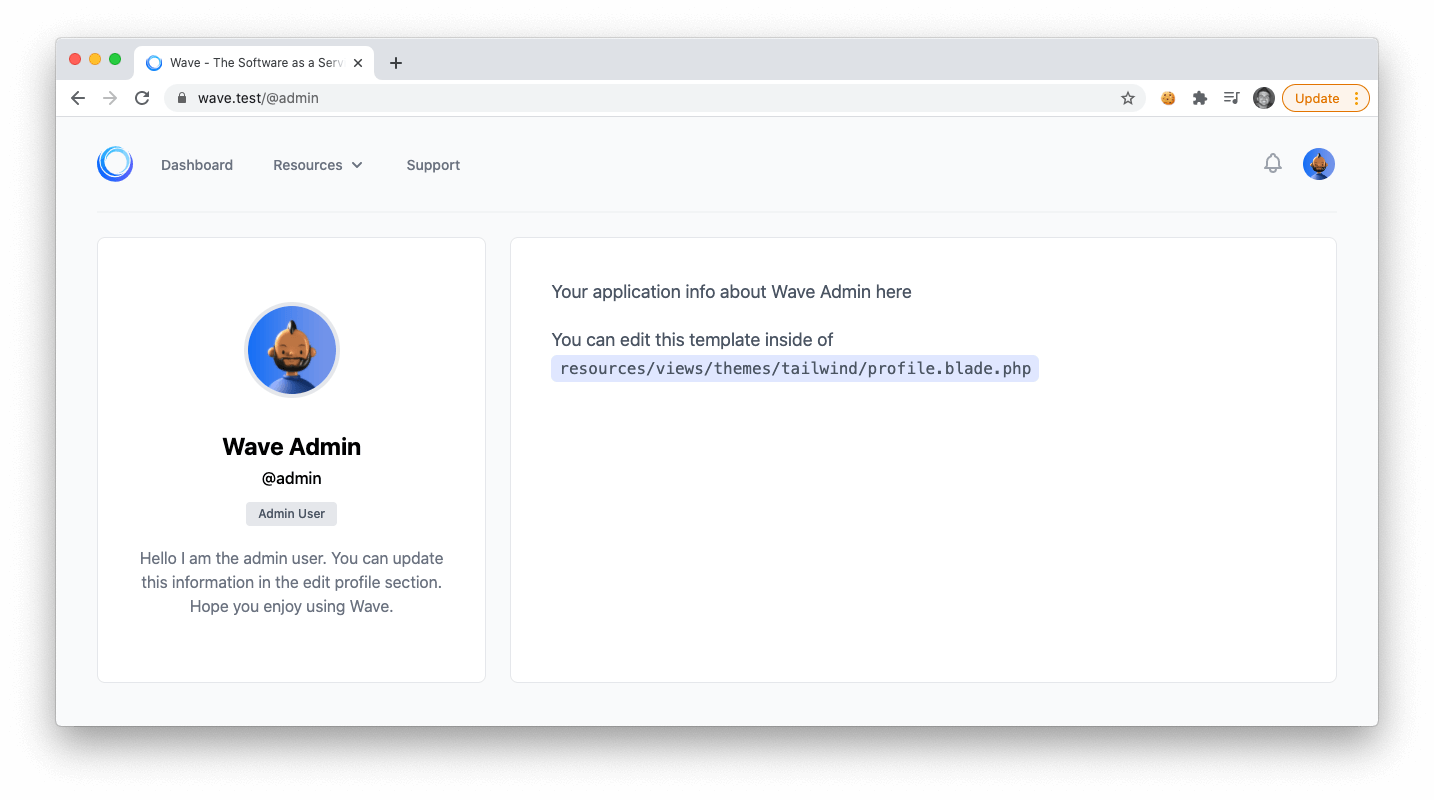
Every user in your application will have a public profile page. The user will be able to visit `/@username` and view their profile. By default the profile page is public, which means anyone can visit that user profile.
|
|||
|
|
|
|||
|
|
|
|||
|
|
|
|||
|
|
In some applications you may not have a need for a profile page. In that case, you can include the following route to your applications `routes/web.php`
|
|||
|
|
|
|||
|
|
```php
|
|||
|
|
Route::redirect('@{username}', '/');
|
|||
|
|
```
|
|||
|
|
|
|||
|
|
This will disable user profiles and redirect any user profile page back to the homepage.
|
|||
|
|
|
|||
|
|
> {warning} When disabling user profiles, the route must be placed after the `Wave::routes();` line.
|
|||
|
|
|
|||
|
|
---
|
|||
|
|
|
|||
|
|
<a name="profile-settings"></a>
|
|||
|
|
### User Profile Settings
|
|||
|
|
|
|||
|
|
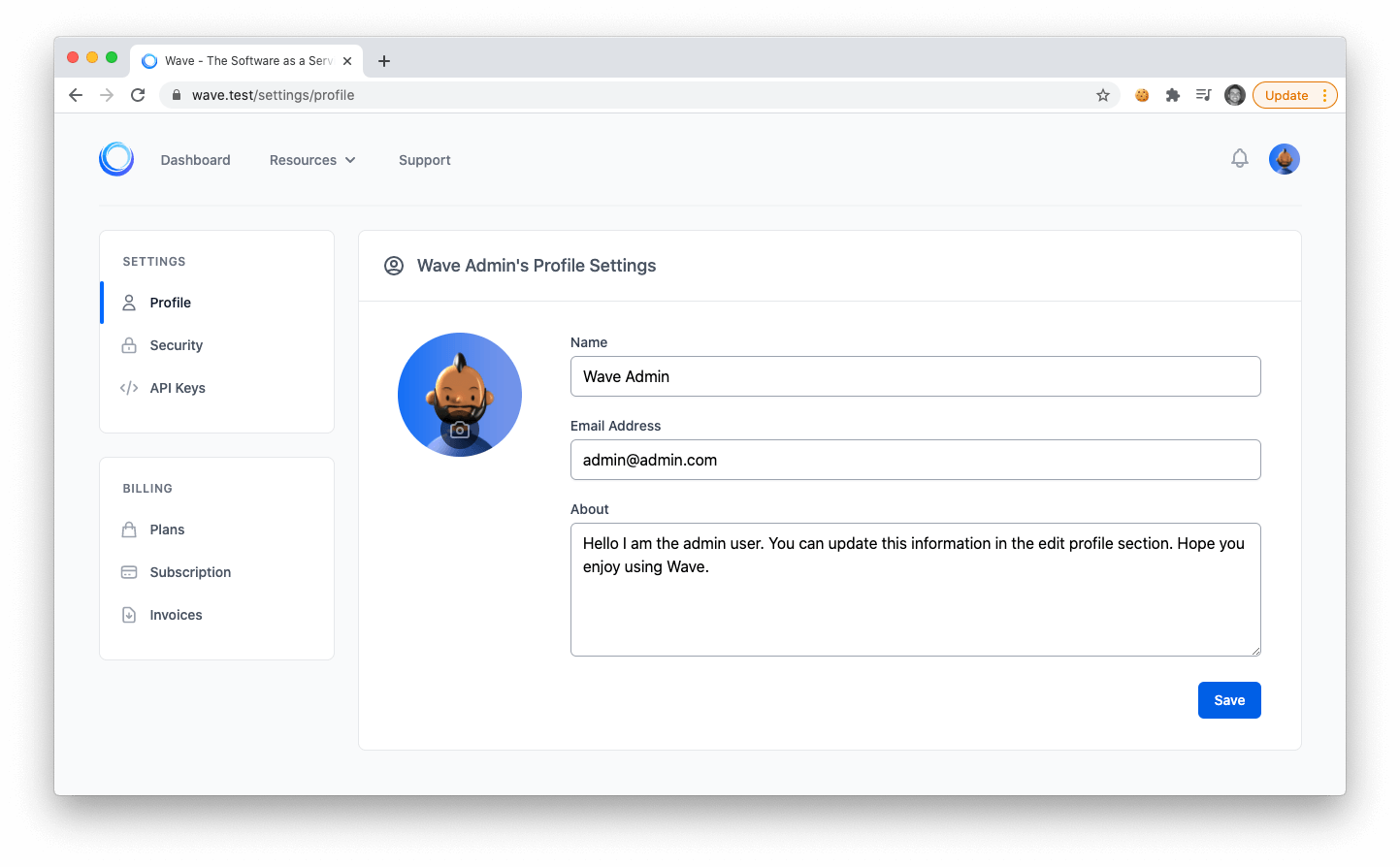
When a user registers for an account they will be able to edit their profile information by clicking on the settings in their user drop down.
|
|||
|
|
|
|||
|
|
On the user profile page the user can update their avatar, name, and email address. You will also see one more field, called `about`, this is an example of a custom profile field. Let's learn more about custom profile fields below.
|
|||
|
|
|
|||
|
|
|
|||
|
|
|
|||
|
|
---
|
|||
|
|
|
|||
|
|
<a name="custom-profile-fields"></a>
|
|||
|
|
### Custom Profile Fields
|
|||
|
|
|
|||
|
|
Custom profile fields allow you to add new fields in your user settings page. In the current theme you'll see a custom field called **about**. The **about** text_area can be generated with the following code:
|
|||
|
|
|
|||
|
|
```php
|
|||
|
|
echo profile_field('text_area', 'about')
|
|||
|
|
```
|
|||
|
|
|
|||
|
|
> {primary} This line of code can be found in each theme, which is located at: `resources/views/themes/{theme_name}/settings/partials/profile.blade.php`.
|
|||
|
|
|
|||
|
|
The `profile_field($type, $key)` function takes 2 arguments. The **type** of field, and the **key**.
|
|||
|
|
|
|||
|
|
We can then use the **key** to reference the value of the users custom profile value. For instance to display the user's **about** value we can do the following:
|
|||
|
|
|
|||
|
|
```php
|
|||
|
|
auth()->user()->profile('about');
|
|||
|
|
```
|
|||
|
|
|
|||
|
|
---
|
|||
|
|
|
|||
|
|
The *about* field uses a *text_area* type to display a text area. In the next part we will list the different types of profile fields you can display.
|
|||
|
|
|
|||
|
|
<a name="profile-field-types"></a>
|
|||
|
|
### Profile Field Types
|
|||
|
|
|
|||
|
|
- **checkbox** - display a form check box
|
|||
|
|
- **code_editor** - display a code editor (may require additional js libraries)
|
|||
|
|
- **color** - display a color picker
|
|||
|
|
- **date** - display a date picker (may require additional js libs)
|
|||
|
|
- **file** - display a file input
|
|||
|
|
- **hidden** - display a hidden input
|
|||
|
|
- **image** - display an image input
|
|||
|
|
- **markdown_editor** - display a markdown editor (more js required)
|
|||
|
|
- **multiple_images** - display multiple image input
|
|||
|
|
- **number** - display a number input
|
|||
|
|
- **password** - display a password input
|
|||
|
|
- **radio_btn** - display a radio button input
|
|||
|
|
- **rich_text_box** - display a rich text editor (requires tinymce js)
|
|||
|
|
- **select_dropdown** - display a select dropdown input
|
|||
|
|
- **text** - display a textbox input
|
|||
|
|
- **text_area** - display a text area input
|
|||
|
|
|
|||
|
|
You can use any of the profile field types above in the **first argument** of the ```profile_field($type, $key)``` function, and use any **key** (string) as the **second argument**.
|
|||
|
|
|
|||
|
|
Then, you can reference the value by calling:
|
|||
|
|
|
|||
|
|
```php
|
|||
|
|
$user = User::find(1);
|
|||
|
|
$user->profile($key);
|
|||
|
|
```
|
|||
|
|
|
|||
|
|
Or you can retrieve the profile value from the authenticated user like so:
|
|||
|
|
|
|||
|
|
```php
|
|||
|
|
auth()->user()->profile($key);
|
|||
|
|
```
|